OIDC Applications
An OIDC application lets any modern app (web, SPA, mobile, or backend) sign users in with MojoAuth using OpenID Connect / OAuth 2.0 — the same standard behind "Sign in with Google".
Create an OIDC application
Open the create wizard
Go to Developers → Applications, click New Application, and choose OIDC / OAuth 2.0.
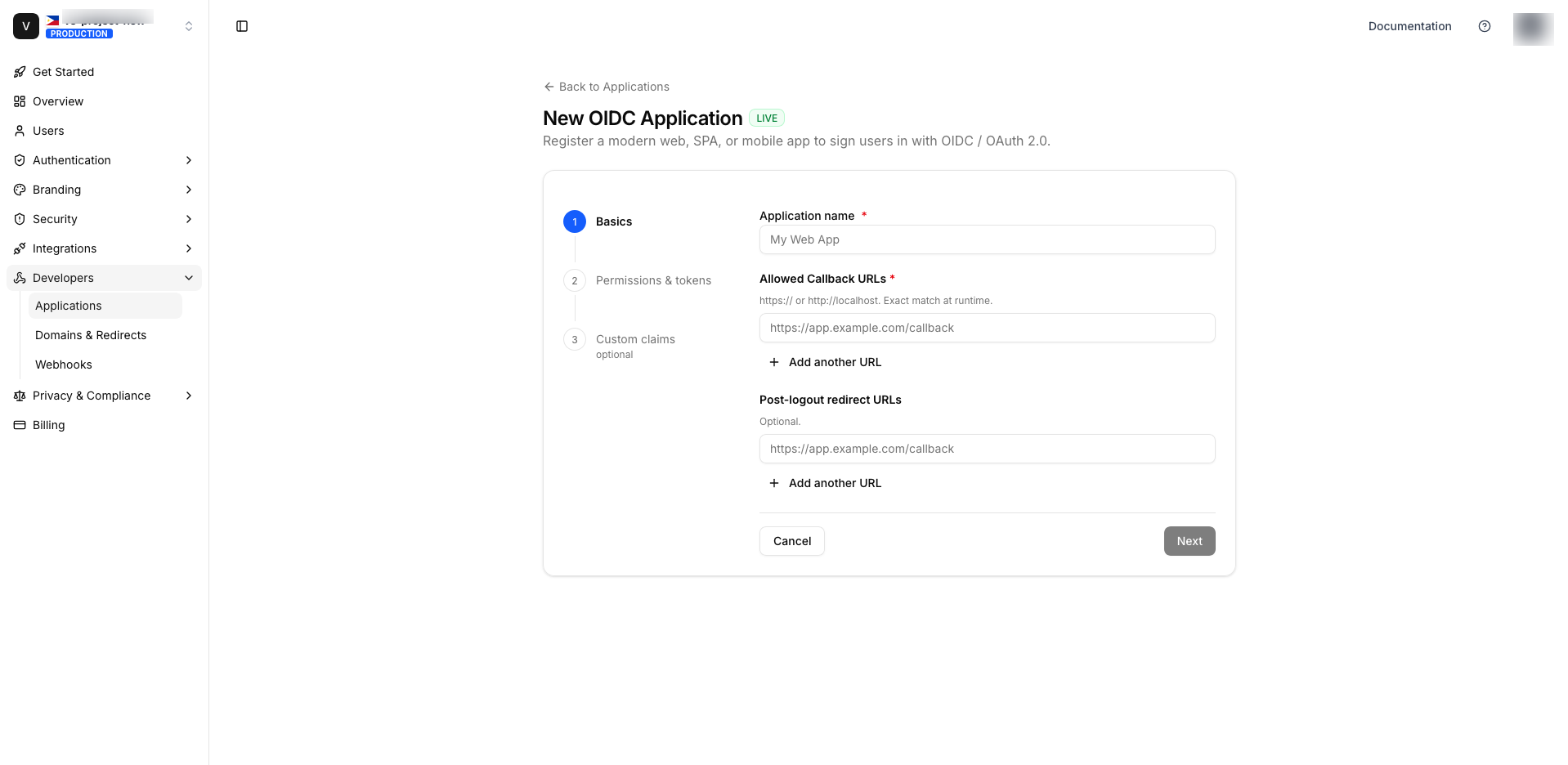
Step 1 — Basics
| Field | Required | Notes |
|---|---|---|
| Application name | ✅ | A label for your list (e.g. Web App). |
| Allowed Callback URLs | ✅ (≥1) | Where MojoAuth returns the authorization code. Must be https://… or http://localhost[:port]. Exact match at runtime. |
| Post-logout redirect URLs | — | Where users land after logout. Same URL rules. |
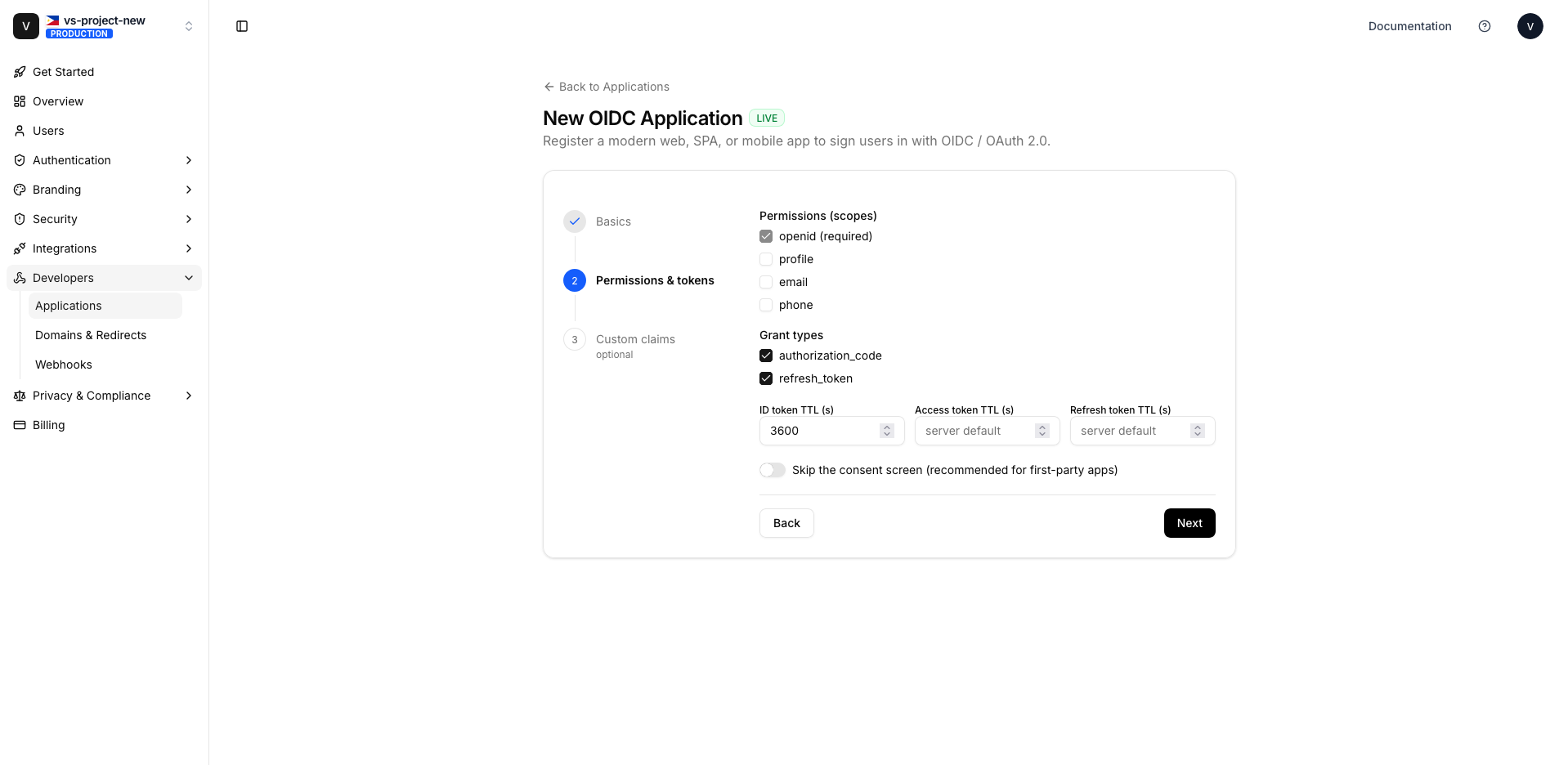
Step 2 — Permissions & tokens
- Scopes — pick from
openid(always on),profile,email,phone. - Grant types —
authorization_codeand/orrefresh_token. - Token lifetimes — ID / access / refresh token TTLs in seconds (leave blank for defaults; ID token defaults to 3600s).
- Skip consent — recommended for first-party / admin-provisioned apps.
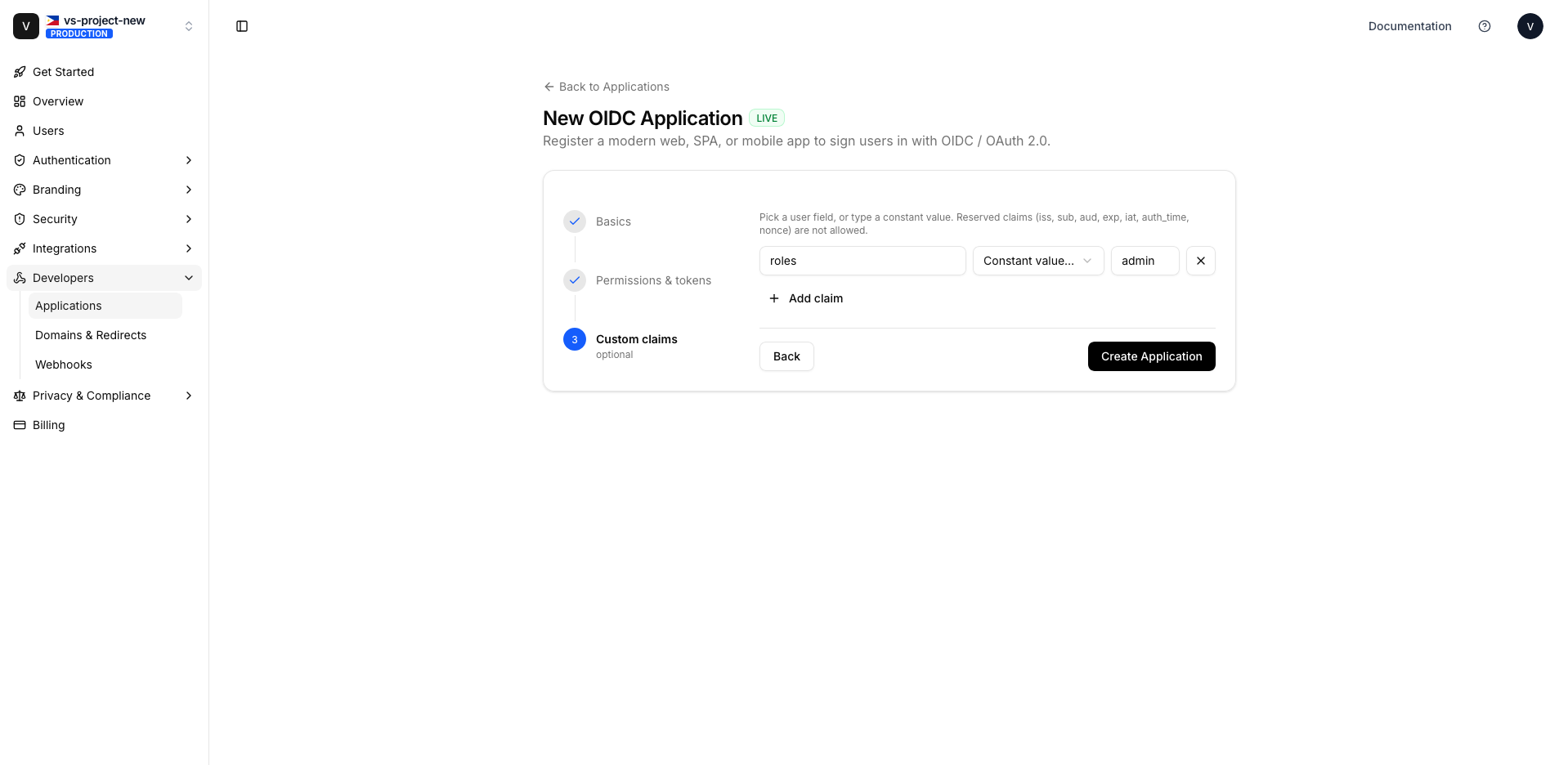
Step 3 — Custom claims (optional)
Add extra claims to the ID token / userinfo. Each mapping is claim_name → source:
- Source = a user field (
email,firstName,lastName,phone,identifier,userId) — pulled from the user. - Source = any other value — emitted verbatim as a constant (e.g.
source: "admin"→"role": "admin").
Reserved claim names (iss, sub, aud, exp, iat, auth_time, nonce) are not allowed.
Create & save the secret
On Create Application, MojoAuth mints and shows your Client ID and Client Secret.
The Client Secret is shown only once. Copy it (or download the .env) immediately — it is stored
hashed and can never be shown again. If you lose it, rotate the secret.
Credentials are self-describing: client_id = ma_cli_{env}_…, client_secret = ma_sec_{env}_…
(where {env} is live or test).
Authentication endpoints
Every OIDC application uses your project's standard OIDC endpoints (relative to {BASE} — see
Overview). You'll also find these on the
application's detail page.
| Endpoint | URL |
|---|---|
| Authorization | {BASE}/oauth/authorize |
| Token | {BASE}/oauth/token |
| UserInfo | {BASE}/oauth/userinfo |
| JWKS | {BASE}/.well-known/jwks.json |
| OpenID Configuration (Discovery) | {BASE}/.well-known/openid-configuration |
| Logout | {BASE}/oauth/logout |
Most OIDC libraries only need the discovery URL ({BASE}/.well-known/openid-configuration) plus
your client_id / client_secret — they auto-discover the rest.
The Authorization Code + PKCE flow
Redirect the user to authorize
{BASE}/oauth/authorize
  ?response_type=code
  &client_id={client_id}
  &redirect_uri={one of your registered Callback URLs}   # must match EXACTLY
  &scope=openid%20email%20profile
  &state={random}
  &nonce={random}
  &code_challenge={S256(code_verifier)}
  &code_challenge_method=S256
User authenticates (and consents)
MojoAuth shows the hosted login page. If the app doesn't skip_consent and the user hasn't consented
before, a consent screen lists the requested scopes. On approval MojoAuth redirects back to your
redirect_uri with ?code=…&state=….
Exchange the code for tokens
curl -X POST {BASE}/oauth/token \
  -d grant_type=authorization_code \
  -d code={code} \
  -d redirect_uri={same redirect_uri} \
  -d client_id={client_id} \
  -d client_secret={client_secret}   # omit for public PKCE clients, send code_verifier instead
Returns an id_token (JWT) and access_token.
Read the user
Decode the id_token claims, or call:
curl {BASE}/oauth/userinfo -H "Authorization: Bearer {access_token}"Exact redirect match. The redirect_uri at /authorize and /oauth/token must byte-for-byte
equal one of your registered Callback URLs (scheme + host + path). A trailing-slash mismatch fails.
Framework quick-starts
// A generic OIDC provider pointed at MojoAuth discovery
providers: [{
  id: 'mojoauth',
  name: 'MojoAuth',
  type: 'oidc',
  issuer: '{BASE}',            // discovery is fetched from {BASE}/.well-known/openid-configuration
  clientId: process.env.MOJOAUTH_CLIENT_ID,
  clientSecret: process.env.MOJOAUTH_CLIENT_SECRET,
}]
Logout
Redirect to {BASE}/oauth/logout and pass your client_id as a query parameter so the URL can be
validated against a registered post-logout redirect URI.
Next steps
- Manage the application — edit, rotate secret, enable/disable, delete.
- Connecting a specific product? See the Integration Guides.